> ## Documentation Index
> Fetch the complete documentation index at: https://developer.pdf.co/llms.txt
> Use this file to discover all available pages before exploring further.
# Custom API Call
> Integrate this step into your Zapier workflow to execute custom API calls to the PDF.co API, designed for advanced users who need more flexibility and control.
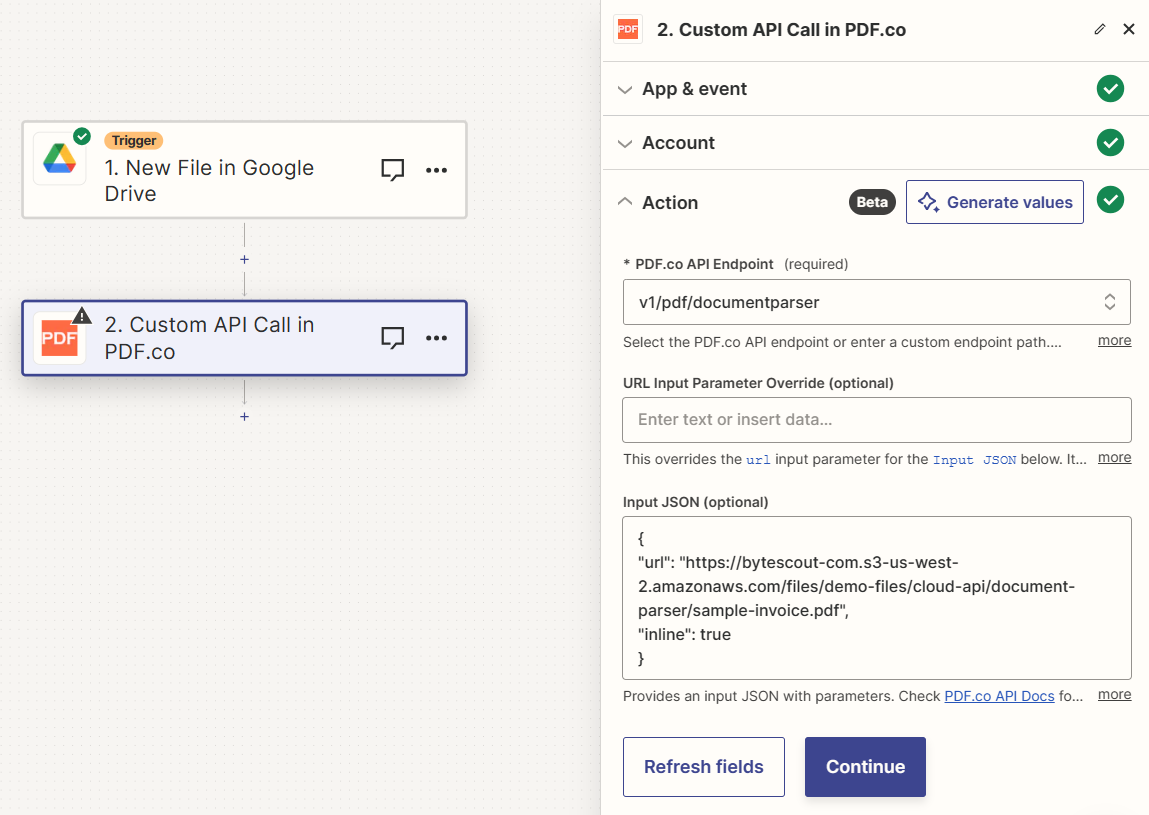 ## Input
| Name | Description | Required |
| - | - | - |
| **PDF.co API Endpoint** | Choose a PDF.co API endpoint or input a custom endpoint path. Consult the [PDF.co API Docs](/api) for detailed information. | Yes |
| **URL Input Parameter Override** | Override the `url` input parameter in the `Input JSON`. Accepts direct links, `filetoken://` links (for files in [PDF.co Built-In Files Storage](https://app.pdf.co/files)), or multiple comma-separated links. Compatible with Google Docs, Google Drive, Dropbox links that are accessible without login. | No |
| **Input JSON** | Provide an input JSON containing the necessary parameters for the API call. | No |
### Source PDF URL & Google
When using **Google Drive**, it’s typically recommended to choose the **File** option. For more advanced file integration techniques, see [Integrating File Sources with pdf.co](/integrations/zapier/input-file-sources).
## Input
| Name | Description | Required |
| - | - | - |
| **PDF.co API Endpoint** | Choose a PDF.co API endpoint or input a custom endpoint path. Consult the [PDF.co API Docs](/api) for detailed information. | Yes |
| **URL Input Parameter Override** | Override the `url` input parameter in the `Input JSON`. Accepts direct links, `filetoken://` links (for files in [PDF.co Built-In Files Storage](https://app.pdf.co/files)), or multiple comma-separated links. Compatible with Google Docs, Google Drive, Dropbox links that are accessible without login. | No |
| **Input JSON** | Provide an input JSON containing the necessary parameters for the API call. | No |
### Source PDF URL & Google
When using **Google Drive**, it’s typically recommended to choose the **File** option. For more advanced file integration techniques, see [Integrating File Sources with pdf.co](/integrations/zapier/input-file-sources).
 ## Output
| Name | Description |
| - | - |
| `url` | The temporary URL on the PDF.co file server. |
| `outputLinkValidTill` | A timestamp which indicates how long the `url` will be available for. |
| `error` | Details of any errors (if any). |
| `status` | The [response status](/api/introduction) code. If all good this will be `200`. |
| `jobId` | The unique identifier for the job. |
| `credits` | The credits spent on the process. |
| `remainingCredits` | The credits left on your account. |
| `duration` | The time it took for the process. |
This documentation is built and hosted on [Mintlify](https://mintlify.com), a developer documentation platform.
## Output
| Name | Description |
| - | - |
| `url` | The temporary URL on the PDF.co file server. |
| `outputLinkValidTill` | A timestamp which indicates how long the `url` will be available for. |
| `error` | Details of any errors (if any). |
| `status` | The [response status](/api/introduction) code. If all good this will be `200`. |
| `jobId` | The unique identifier for the job. |
| `credits` | The credits spent on the process. |
| `remainingCredits` | The credits left on your account. |
| `duration` | The time it took for the process. |
This documentation is built and hosted on [Mintlify](https://mintlify.com), a developer documentation platform.