> ## Documentation Index
> Fetch the complete documentation index at: https://developer.pdf.co/llms.txt
> Use this file to discover all available pages before exploring further.
# Add Text
> Integrate this step into your **Zapier** workflow to add text to **PDF** documents with a range of customization options.
 ## Input
| Name | Description | Required |
| - | - | - |
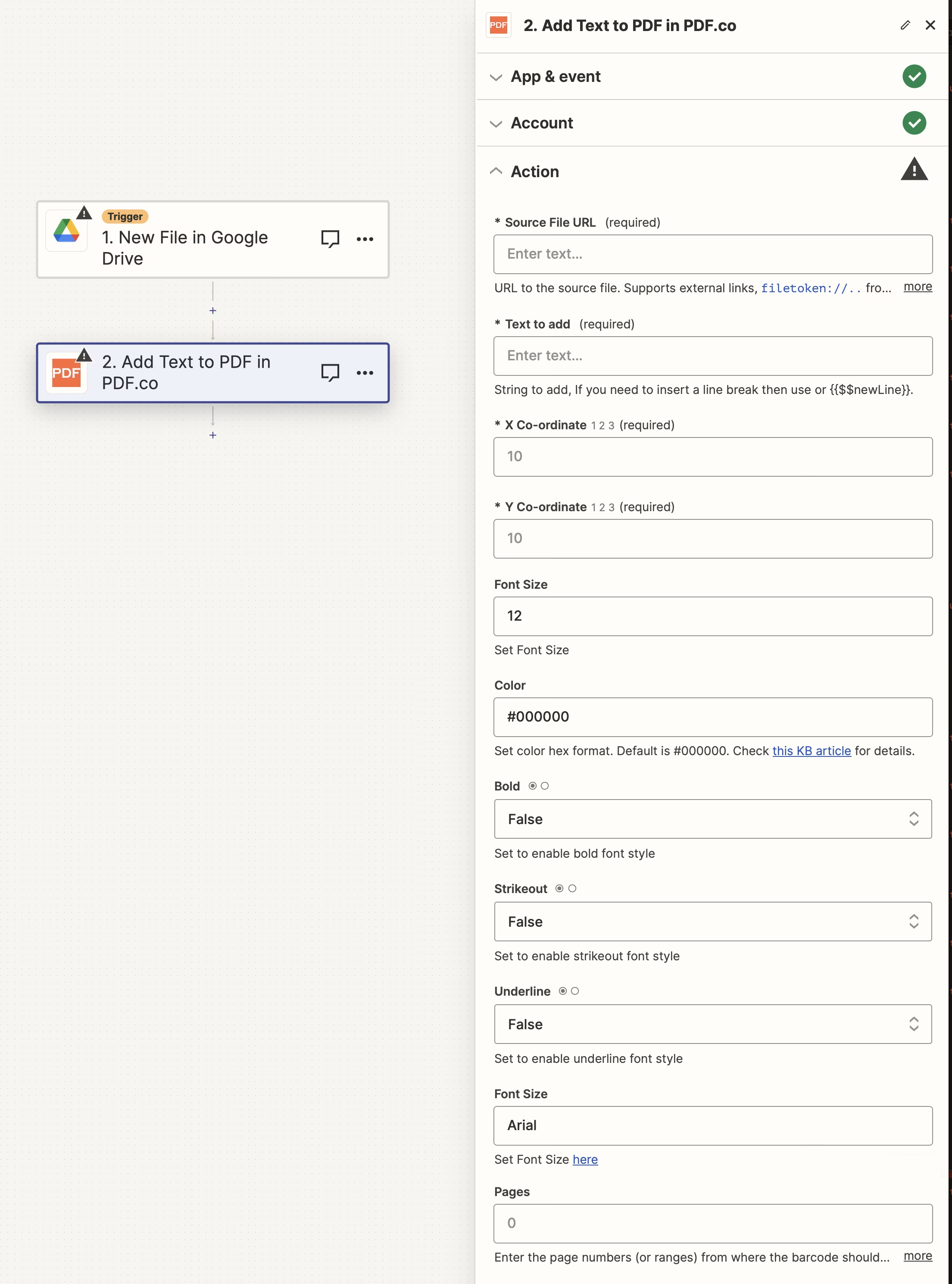
| **Source File URL** | Provide the URL to the source PDF document, or a `filetoken://` link from [PDF.co Built-In Files Storage](https://app.pdf.co/files). If you use another cloud service such as **Google Drive** or **Dropbox** ensure the link is publicly accessible. | Yes |
| **Text to add** | Specify the text to be added. Use `\n` or `{{$$newLine}}` for line breaks, and leverage built-in macros like `{{$$PageNumber}}` and custom data macros. For using special macros on Zapier, see [Macros for Text](/knowledgebase/macros-for-text#special-macro-style%3A-square-brackets). | Yes |
| **X Co-ordinate** | Determine the `X` coordinate for text placement. Use the [PDF.co tool](https://app.pdf.co/pdf-edit-add-helper) to find `X` and `Y` coordinates. | Yes |
| **Y Co-ordinate** | Specify the `Y` coordinate. Assistance for coordinates can be found using the [PDF.co tool](https://app.pdf.co/pdf-edit-add-helper). | Yes |
| **Advanced Options** | Enable this to reveal additional fields | No |
| **FontName** | Select the font name from the [available font list](/knowledgebase/general). The default font is **Arial**. | No |
| **Pages** | Indicate specific page numbers or ranges where the text should be added. Leave blank to include all pages. The first page is numbered `0`. Example: `0,2-5,7-`. | No |
| **Link** | Enter a URL to make the text clickable. | No |
| **Font Size** | Set the font size, with the default being `12`. | No |
| **Color** | Choose the text color in hex format (`#RRGGBB` or `#AARRGGBB`, with `AA` as transparency). The default is `#000000`. | No |
| **Bold** | Enable this to apply bold styling to the font. | No |
| **Strikeout** | Enable this to apply a strikeout effect to the text. | No |
| **Underline** | Enable this to underline the text. | No |
### Source PDF URL & Google
When using **Google Drive**, it’s typically recommended to choose the **File** option. For more advanced file integration techniques, see [Integrating File Sources with pdf.co](/integrations/zapier/input-file-sources).
## Input
| Name | Description | Required |
| - | - | - |
| **Source File URL** | Provide the URL to the source PDF document, or a `filetoken://` link from [PDF.co Built-In Files Storage](https://app.pdf.co/files). If you use another cloud service such as **Google Drive** or **Dropbox** ensure the link is publicly accessible. | Yes |
| **Text to add** | Specify the text to be added. Use `\n` or `{{$$newLine}}` for line breaks, and leverage built-in macros like `{{$$PageNumber}}` and custom data macros. For using special macros on Zapier, see [Macros for Text](/knowledgebase/macros-for-text#special-macro-style%3A-square-brackets). | Yes |
| **X Co-ordinate** | Determine the `X` coordinate for text placement. Use the [PDF.co tool](https://app.pdf.co/pdf-edit-add-helper) to find `X` and `Y` coordinates. | Yes |
| **Y Co-ordinate** | Specify the `Y` coordinate. Assistance for coordinates can be found using the [PDF.co tool](https://app.pdf.co/pdf-edit-add-helper). | Yes |
| **Advanced Options** | Enable this to reveal additional fields | No |
| **FontName** | Select the font name from the [available font list](/knowledgebase/general). The default font is **Arial**. | No |
| **Pages** | Indicate specific page numbers or ranges where the text should be added. Leave blank to include all pages. The first page is numbered `0`. Example: `0,2-5,7-`. | No |
| **Link** | Enter a URL to make the text clickable. | No |
| **Font Size** | Set the font size, with the default being `12`. | No |
| **Color** | Choose the text color in hex format (`#RRGGBB` or `#AARRGGBB`, with `AA` as transparency). The default is `#000000`. | No |
| **Bold** | Enable this to apply bold styling to the font. | No |
| **Strikeout** | Enable this to apply a strikeout effect to the text. | No |
| **Underline** | Enable this to underline the text. | No |
### Source PDF URL & Google
When using **Google Drive**, it’s typically recommended to choose the **File** option. For more advanced file integration techniques, see [Integrating File Sources with pdf.co](/integrations/zapier/input-file-sources).
 ## Output
| Name | Description |
| - | - |
| `url` | The temporary **URL** on the **PDF.co** file server. |
| `outputLinkValidTill` | A timestamp which indicates how long the `url` will be available for. |
| `error` | Details of any errors (if any). |
| `status` | The [response status](/api/introduction) code. If all good this will be `200`. |
| `name` | The name of the file. |
| `jobId` | The unique identifier for the job. |
| `credits` | The credits spent on the process. |
| `remainingCredits` | The credits left on your account. |
| `duration` | The time it took for the process. |
This documentation is built and hosted on [Mintlify](https://mintlify.com), a developer documentation platform.
## Output
| Name | Description |
| - | - |
| `url` | The temporary **URL** on the **PDF.co** file server. |
| `outputLinkValidTill` | A timestamp which indicates how long the `url` will be available for. |
| `error` | Details of any errors (if any). |
| `status` | The [response status](/api/introduction) code. If all good this will be `200`. |
| `name` | The name of the file. |
| `jobId` | The unique identifier for the job. |
| `credits` | The credits spent on the process. |
| `remainingCredits` | The credits left on your account. |
| `duration` | The time it took for the process. |
This documentation is built and hosted on [Mintlify](https://mintlify.com), a developer documentation platform.