> ## Documentation Index
> Fetch the complete documentation index at: https://developer.pdf.co/llms.txt
> Use this file to discover all available pages before exploring further.
# Search in PDF
> This operation enables you to search for specific text or keywords within your PDF documents or scanned images.
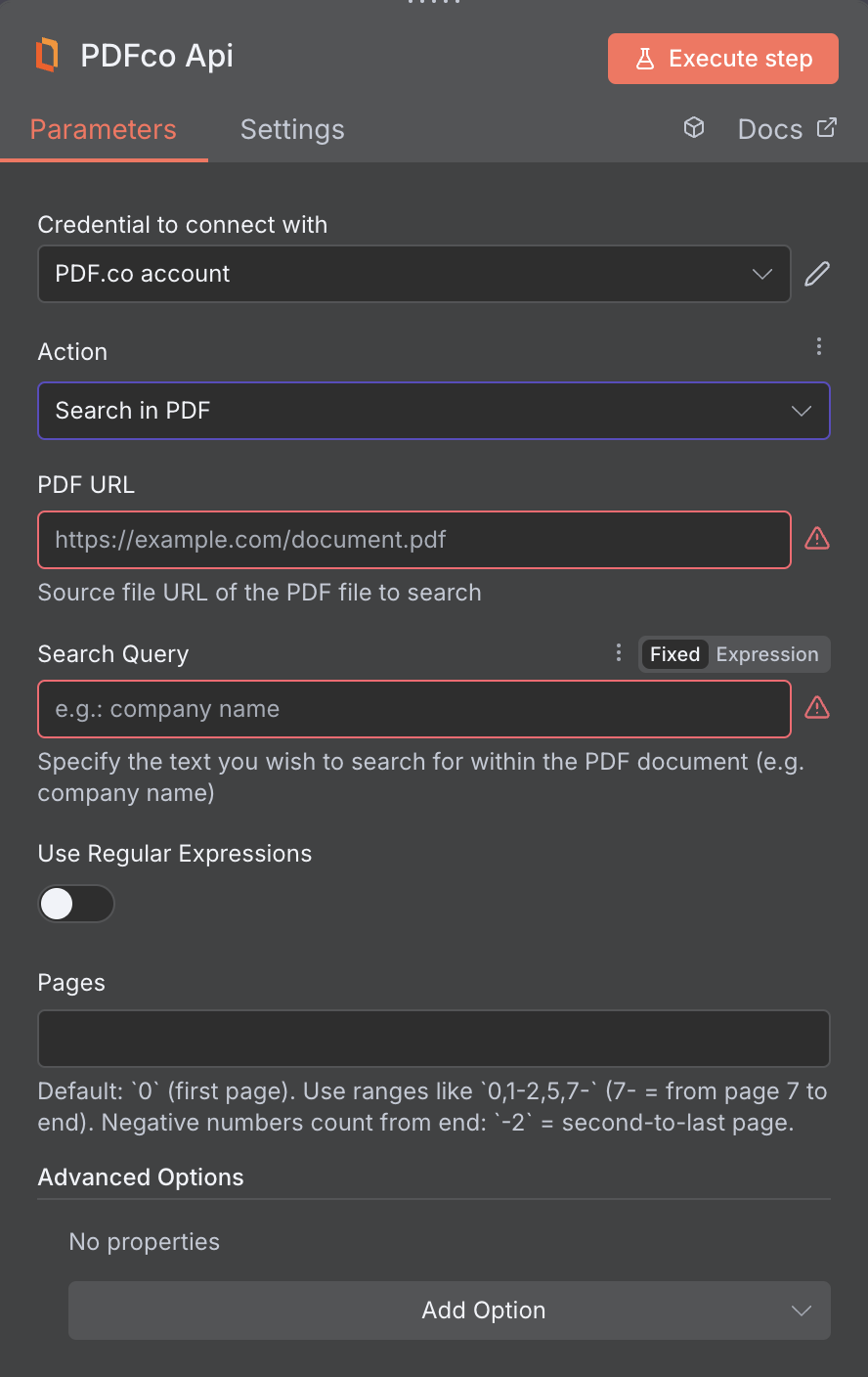 ## Input
The n8n node doesn't expose every PDF.co API parameter as a field. To pass a parameter that isn't shown, use the **Custom Profiles** field with `std_params`. See [Standard Parameters](/api/profiles#standard-parameters).
| Name | Description | Required |
| :- | :- | :- |
| PDF URL | Provide the URL to the source PDF document, or a `filetoken://` link from [PDF.co Built-In Files Storage](https://app.pdf.co/tools/files). If you use another cloud service such as **Google Drive** or **Dropbox** ensure the link is publicly accessible. | Yes |
| Search Query | Specify the text you wish to search for within the PDF document (e.g. company name). | Yes |
| Use Regular Expressions | Set to true to enable regular expression search for the searchString(s) parameter. | No |
| Pages | Specify the page indices to search, using comma-separated values or ranges (e.g., “`0,1,2-`” or “`1,2,3-7`”). Page indexing starts at `0`. Use “!” before a number to count from the end (e.g., “`!0`” for the last page). Leave empty to search all pages. The input must be a string. | No |
| File Name | File name for the generated output, the input must be in string format. | No |
| Webhook URL | The callback URL or Webhook used to receive the output data. | No |
| Output Links Expiration (In Minutes) | Set the expiration time for the output link in minutes. After this specified duration, any generated output file(s) will be automatically deleted from [**PDF.co Temporary Files Storage**](https://developer.pdf.co/api/file-upload/overview). The maximum duration for link expiration varies based on your current subscription plan. To store permanent input files (e.g. re-usable images, pdf templates, documents) consider using [**PDF.co Built-In Files Storage**](https://app.pdf.co/tools/files). | No |
| Inline | Set to true to return results inside the response. Otherwise, the endpoint will return a URL to the output file generated. | No |
| Word Matching Mode | `WordMatchingMode` defines how search terms match PDF text. Modes: `None` (exact string match only), `SmartMatch` (default; flexible word boundary match, includes letters/digits/punctuation), `ExactMatch` (strict word boundaries, whole-word match only). | No |
| Password | The password of the password-protected PDF file | No |
| HTTP Username | HTTP auth user name if required to access source URL. | No |
| HTTP Password | HTTP auth password if required to access source URL. | No |
| Custom Profiles | Use JSON to customize PDF processing with options like output resolution, OCR settings, text extraction methods, encryption, and image handling. Check our [Custom Profiles](#custom-profiles) section to see all available parameters for your current endpoint. | No |
## Custom Profiles
You can set additional options for the operation used in the PDF.co node by using **Custom Profiles**. A custom profile is a string in **JSON-like** format containing predefined parameters.
Here’s an example of a Custom Profiles input:
```
{ 'OCRDetectPageRotation': true }
```
With this input, the PDF.co operation will rotate the scanned PDF automatically. You can find the list of available parameters for customizing profiles in the PDF.co operation documentation below:
You can use any regular API parameter from the [API Reference](/api) within n8n using the `std_params` feature in profiles. The `std_params` enables the definition of regular API parameters in a JSON format, See [Standard Parameters](/api/profiles#standard-parameters) for detailed documentation and examples.
| Parameter | Type | Default | Description |
| :- | :- | :- | :- |
| `ColumnDetectionMode` | string | `ContentGroupsAndBorders` | Controls column detection/alignment in PDF table extraction. Modes: `ContentGroupsAndBorders` (default; text + lines), `ContentGroups` (text grouping only), `Borders` (lines only), `BorderedTables` (OCR-based for bordered tables), `ContentGroupsAI` (AI for dense/complex layouts). |
| `DetectionMinNumberOfRows` | integer | 1 | Minimum number of rows to detect in a table |
| `DetectionMinNumberOfColumns` | integer | 1 | Minimum number of columns to detect in a table |
| `DetectionMaxNumberOfInvalidSubsequentRowsAllowed` | integer | `0` | Maximum number of invalid subsequent rows allowed in a table |
| `DetectionMinNumberOfLineBreaksBetweenTables` | integer | `0` | Minimum number of line breaks between tables |
| `EnhanceTableBorders` | boolean | `true` | Enhance table borders or not |
| `OCRDetectPageRotation` | boolean | `false` | Controls whether to detect page rotation in the PDF document when OCR applied. Set to true to detect page rotation. See [**Support page rotation**](https://developer.pdf.co/api/pdf-find/basic#support-page-rotation) for more information. |
| `DataEncryptionAlgorithm` | string | - | Controls the encryption algorithm used for data encryption. See [**User-Controlled Encryption**](https://developer.pdf.co/knowledgebase/user-controlled-encryption) for more information. The available algorithms are: `AES128`, `AES192`, `AES256`. |
| `DataEncryptionKey` | string | - | Controls the encryption key used for data encryption. See [**User-Controlled Encryption**](/knowledgebase/user-controlled-encryption) for more information. |
| `DataEncryptionIV` | string | - | Controls the encryption IV used for data encryption. See [**User-Controlled Encryption**](/knowledgebase/user-controlled-encryption) for more information. |
| `DataDecryptionAlgorithm` | string | - | Controls the decryption algorithm used for data decryption. See [**User-Controlled Encryption**](/knowledgebase/user-controlled-encryption) for more information. The available algorithms are: `AES128`, `AES192`, `AES256`. |
| `DataDecryptionKey` | string | - | Controls the decryption key used for data decryption. See [**User-Controlled Encryption**](/knowledgebase/user-controlled-encryption) for more information. |
| `DataDecryptionIV` | string | - | Controls the decryption IV used for data decryption. See [**User-Controlled Encryption**](/knowledgebase/user-controlled-encryption) for more information. |
You can also use `Custom Profiles` to:
* [Limit search to bordered tables only](https://developer.pdf.co/api/pdf-find/basic#find-only-bordered-tables)
* Visit this page for [general information on Profiles usage.](https://developer.pdf.co/api/profiles)
## Output
| Name | Description |
| :- | :- |
| `jobId` | Unique identifier for the background job. |
| `pageCount` | Number of pages in the PDF document. |
| `error` | Indicates whether an error occurred (`false` means success) |
| `status` | Status code of the request (200, 404, 500, etc.). For more information, see [**Response Codes**](/api/response-codes). |
| `credits` | Number of credits consumed by the request |
| `remainingCredits` | Number of credits remaining in the account |
| `duration` | Time taken for the operation in milliseconds |
| `url` | Direct URL to the final PDF file stored in S3. |
| `name` | Name of the output file |
| `outputLinkValidTill` | Timestamp indicating when the output link will expire |
This documentation is built and hosted on [Mintlify](https://mintlify.com), a developer documentation platform.
## Input
The n8n node doesn't expose every PDF.co API parameter as a field. To pass a parameter that isn't shown, use the **Custom Profiles** field with `std_params`. See [Standard Parameters](/api/profiles#standard-parameters).
| Name | Description | Required |
| :- | :- | :- |
| PDF URL | Provide the URL to the source PDF document, or a `filetoken://` link from [PDF.co Built-In Files Storage](https://app.pdf.co/tools/files). If you use another cloud service such as **Google Drive** or **Dropbox** ensure the link is publicly accessible. | Yes |
| Search Query | Specify the text you wish to search for within the PDF document (e.g. company name). | Yes |
| Use Regular Expressions | Set to true to enable regular expression search for the searchString(s) parameter. | No |
| Pages | Specify the page indices to search, using comma-separated values or ranges (e.g., “`0,1,2-`” or “`1,2,3-7`”). Page indexing starts at `0`. Use “!” before a number to count from the end (e.g., “`!0`” for the last page). Leave empty to search all pages. The input must be a string. | No |
| File Name | File name for the generated output, the input must be in string format. | No |
| Webhook URL | The callback URL or Webhook used to receive the output data. | No |
| Output Links Expiration (In Minutes) | Set the expiration time for the output link in minutes. After this specified duration, any generated output file(s) will be automatically deleted from [**PDF.co Temporary Files Storage**](https://developer.pdf.co/api/file-upload/overview). The maximum duration for link expiration varies based on your current subscription plan. To store permanent input files (e.g. re-usable images, pdf templates, documents) consider using [**PDF.co Built-In Files Storage**](https://app.pdf.co/tools/files). | No |
| Inline | Set to true to return results inside the response. Otherwise, the endpoint will return a URL to the output file generated. | No |
| Word Matching Mode | `WordMatchingMode` defines how search terms match PDF text. Modes: `None` (exact string match only), `SmartMatch` (default; flexible word boundary match, includes letters/digits/punctuation), `ExactMatch` (strict word boundaries, whole-word match only). | No |
| Password | The password of the password-protected PDF file | No |
| HTTP Username | HTTP auth user name if required to access source URL. | No |
| HTTP Password | HTTP auth password if required to access source URL. | No |
| Custom Profiles | Use JSON to customize PDF processing with options like output resolution, OCR settings, text extraction methods, encryption, and image handling. Check our [Custom Profiles](#custom-profiles) section to see all available parameters for your current endpoint. | No |
## Custom Profiles
You can set additional options for the operation used in the PDF.co node by using **Custom Profiles**. A custom profile is a string in **JSON-like** format containing predefined parameters.
Here’s an example of a Custom Profiles input:
```
{ 'OCRDetectPageRotation': true }
```
With this input, the PDF.co operation will rotate the scanned PDF automatically. You can find the list of available parameters for customizing profiles in the PDF.co operation documentation below:
You can use any regular API parameter from the [API Reference](/api) within n8n using the `std_params` feature in profiles. The `std_params` enables the definition of regular API parameters in a JSON format, See [Standard Parameters](/api/profiles#standard-parameters) for detailed documentation and examples.
| Parameter | Type | Default | Description |
| :- | :- | :- | :- |
| `ColumnDetectionMode` | string | `ContentGroupsAndBorders` | Controls column detection/alignment in PDF table extraction. Modes: `ContentGroupsAndBorders` (default; text + lines), `ContentGroups` (text grouping only), `Borders` (lines only), `BorderedTables` (OCR-based for bordered tables), `ContentGroupsAI` (AI for dense/complex layouts). |
| `DetectionMinNumberOfRows` | integer | 1 | Minimum number of rows to detect in a table |
| `DetectionMinNumberOfColumns` | integer | 1 | Minimum number of columns to detect in a table |
| `DetectionMaxNumberOfInvalidSubsequentRowsAllowed` | integer | `0` | Maximum number of invalid subsequent rows allowed in a table |
| `DetectionMinNumberOfLineBreaksBetweenTables` | integer | `0` | Minimum number of line breaks between tables |
| `EnhanceTableBorders` | boolean | `true` | Enhance table borders or not |
| `OCRDetectPageRotation` | boolean | `false` | Controls whether to detect page rotation in the PDF document when OCR applied. Set to true to detect page rotation. See [**Support page rotation**](https://developer.pdf.co/api/pdf-find/basic#support-page-rotation) for more information. |
| `DataEncryptionAlgorithm` | string | - | Controls the encryption algorithm used for data encryption. See [**User-Controlled Encryption**](https://developer.pdf.co/knowledgebase/user-controlled-encryption) for more information. The available algorithms are: `AES128`, `AES192`, `AES256`. |
| `DataEncryptionKey` | string | - | Controls the encryption key used for data encryption. See [**User-Controlled Encryption**](/knowledgebase/user-controlled-encryption) for more information. |
| `DataEncryptionIV` | string | - | Controls the encryption IV used for data encryption. See [**User-Controlled Encryption**](/knowledgebase/user-controlled-encryption) for more information. |
| `DataDecryptionAlgorithm` | string | - | Controls the decryption algorithm used for data decryption. See [**User-Controlled Encryption**](/knowledgebase/user-controlled-encryption) for more information. The available algorithms are: `AES128`, `AES192`, `AES256`. |
| `DataDecryptionKey` | string | - | Controls the decryption key used for data decryption. See [**User-Controlled Encryption**](/knowledgebase/user-controlled-encryption) for more information. |
| `DataDecryptionIV` | string | - | Controls the decryption IV used for data decryption. See [**User-Controlled Encryption**](/knowledgebase/user-controlled-encryption) for more information. |
You can also use `Custom Profiles` to:
* [Limit search to bordered tables only](https://developer.pdf.co/api/pdf-find/basic#find-only-bordered-tables)
* Visit this page for [general information on Profiles usage.](https://developer.pdf.co/api/profiles)
## Output
| Name | Description |
| :- | :- |
| `jobId` | Unique identifier for the background job. |
| `pageCount` | Number of pages in the PDF document. |
| `error` | Indicates whether an error occurred (`false` means success) |
| `status` | Status code of the request (200, 404, 500, etc.). For more information, see [**Response Codes**](/api/response-codes). |
| `credits` | Number of credits consumed by the request |
| `remainingCredits` | Number of credits remaining in the account |
| `duration` | Time taken for the operation in milliseconds |
| `url` | Direct URL to the final PDF file stored in S3. |
| `name` | Name of the output file |
| `outputLinkValidTill` | Timestamp indicating when the output link will expire |
This documentation is built and hosted on [Mintlify](https://mintlify.com), a developer documentation platform.