> ## Documentation Index
> Fetch the complete documentation index at: https://developer.pdf.co/llms.txt
> Use this file to discover all available pages before exploring further.
# Merge PDF
> This operation merges multiple PDF files into a single PDF document. You can enable the auto-conversion feature to automatically convert DOC, DOCX, XLS, JPG, PNG, MSG, and EML files to PDF before merging.
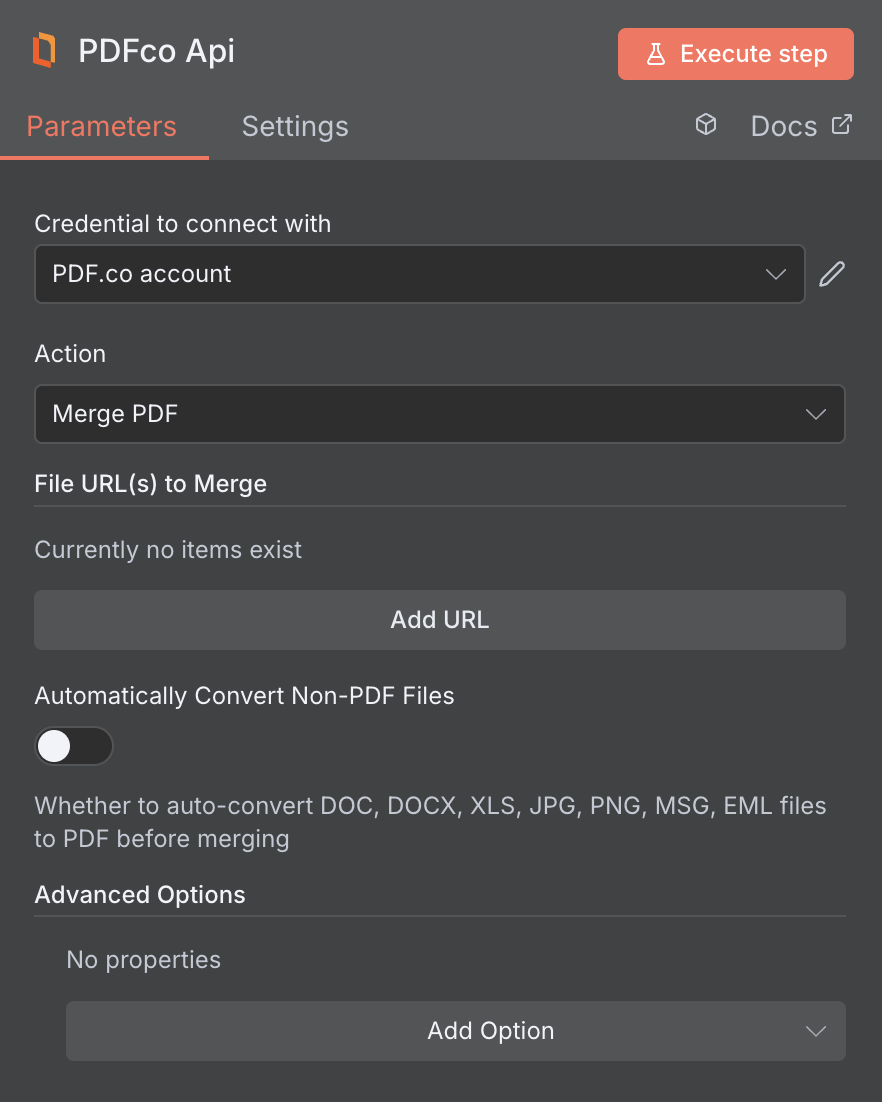 The total combined size of all input file URls must not exceed **2 GB**. Requests that exceed this limit will not be processed.
## Input
The n8n node doesn't expose every PDF.co API parameter as a field. To pass a parameter that isn't shown, use the **Custom Profiles** field with `std_params`. See [Standard Parameters](/api/profiles#standard-parameters).
| Name | Description | Required |
| :- | :- | :- |
| **Input Links** | A comma-separated list of files to merge. If you use a cloud service such as **Google Drive** or **Dropbox** ensure the links are publicly accessible. | Yes |
| **Automatically Convert Non-PDF Files** | Whether to automatically convert non-PDF files to PDF before the merging operation. Supported documents: **DOC, DOCX, XLS, JPG, PNG, MSG,** and **EML**. | No |
| **File Name** | File name for the generated output, the input must be in string format. | No |
| **Webhook URL** | The callback URL or Webhook used to receive the output data. | No |
| **HTTP Username** | HTTP auth user name if required to access source URL. | No |
| **HTTP Password** | HTTP auth password if required to access source URL. | No |
| **Custom Profiles** | Use JSON to customize PDF processing with options like output resolution, OCR settings, text extraction methods, encryption, and image handling. Check our [Custom Profiles](#custom-profiles) section to see all available parameters for your current endpoint. | No |
## Custom Profiles
You can set additional options for the operation used in the PDF.co node by using **Custom Profiles**. A custom profile is a string in **JSON-like** format containing predefined parameters.
Here’s an example of a Custom Profiles input:
```
{ "outputDataFormat": "base64" }
```
With this input, the PDF.co operation will return the output in `base64` format. You can find the list of available parameters for customizing profiles in the PDF.co operation documentation below:
You can use any regular API parameter from the [API Reference](/api) within n8n using the `std_params` feature in profiles. The `std_params` enables the definition of regular API parameters in a JSON format, See [Standard Parameters](/api/profiles#standard-parameters) for detailed documentation and examples.
| Parameter | Type | Default | Description |
| :- | :- | :- | :- |
| `outputDataFormat` | string | - | If you require your output as `base64` format, set this to `base64` |
| `RenameMatchingFieldsDuringMerge` | boolean | `true` | This feature enables the renaming of field names during the merging of PDF files which contain forms. If set to `false`, it will retain the original field names. This is helpful for merged PDF forms with identical field names when the customer wants to auto-fill the identical field names in other pages. |
| `GenerateBookmarks` | boolean | `false` | This adds bookmarks to the merged document with names assigned to every merged document in the same order. |
| `BookmarkTitles` | array\[string] | - | An array containing the titles/names for bookmarks to be created. |
| `zipIncludeFilter` | string | - | You can control which files to include and exclude from input zip files with a profiles. |
| `zipExcludeFilter` | string | - | `zipIncludeFilter` and `zipExcludeFilter` support `*` and `?` wildcards. |
| `MergedDocumentTitle` | string | Title of the first document | Specifies a custom title for the merged document. Overrides the title of the first document during the merge process. |
| `DataEncryptionAlgorithm` | string | - | Controls the encryption algorithm used for data encryption. See [**User-Controlled Encryption**](/knowledgebase/user-controlled-encryption) for more information. The available algorithms are: `AES128`, `AES192`, `AES256`. |
| `DataEncryptionKey` | string | - | Controls the encryption key used for data encryption. See [**User-Controlled Encryption**](/knowledgebase/user-controlled-encryption) for more information. |
| `DataEncryptionIV` | string | - | Controls the encryption IV used for data encryption. See [**User-Controlled Encryption**](/knowledgebase/user-controlled-encryption) for more information. |
| `DataDecryptionAlgorithm` | string | - | Controls the decryption algorithm used for data decryption. See [**User-Controlled Encryption**](/knowledgebase/user-controlled-encryption) for more information. The available algorithms are: `AES128`, `AES192`, `AES256`. |
| `DataDecryptionKey` | string | - | Controls the decryption key used for data decryption. See [**User-Controlled Encryption**](/knowledgebase/user-controlled-encryption) for more information. |
| `DataDecryptionIV` | string | - | Controls the decryption IV used for data decryption. See [**User-Controlled Encryption**](/knowledgebase/user-controlled-encryption) for more information. |
## Output
| Name | Description |
| :- | :- |
| `jobId` | Unique identifier for the background job. |
| `pageCount` | Number of pages in the PDF document. |
| `error` | Indicates whether an error occurred (`false` means success) |
| `status` | Status code of the request (200, 404, 500, etc.). For more information, see [**Response Codes**](/api/response-codes). |
| `credits` | Number of credits consumed by the request |
| `remainingCredits` | Number of credits remaining in the account |
| `duration` | Time taken for the operation in milliseconds |
| `url` | Direct URL to the final PDF file stored in S3. |
| `name` | Name of the output file |
| `outputLinkValidTill` | Timestamp indicating when the output link will expire |
This documentation is built and hosted on [Mintlify](https://mintlify.com), a developer documentation platform.
The total combined size of all input file URls must not exceed **2 GB**. Requests that exceed this limit will not be processed.
## Input
The n8n node doesn't expose every PDF.co API parameter as a field. To pass a parameter that isn't shown, use the **Custom Profiles** field with `std_params`. See [Standard Parameters](/api/profiles#standard-parameters).
| Name | Description | Required |
| :- | :- | :- |
| **Input Links** | A comma-separated list of files to merge. If you use a cloud service such as **Google Drive** or **Dropbox** ensure the links are publicly accessible. | Yes |
| **Automatically Convert Non-PDF Files** | Whether to automatically convert non-PDF files to PDF before the merging operation. Supported documents: **DOC, DOCX, XLS, JPG, PNG, MSG,** and **EML**. | No |
| **File Name** | File name for the generated output, the input must be in string format. | No |
| **Webhook URL** | The callback URL or Webhook used to receive the output data. | No |
| **HTTP Username** | HTTP auth user name if required to access source URL. | No |
| **HTTP Password** | HTTP auth password if required to access source URL. | No |
| **Custom Profiles** | Use JSON to customize PDF processing with options like output resolution, OCR settings, text extraction methods, encryption, and image handling. Check our [Custom Profiles](#custom-profiles) section to see all available parameters for your current endpoint. | No |
## Custom Profiles
You can set additional options for the operation used in the PDF.co node by using **Custom Profiles**. A custom profile is a string in **JSON-like** format containing predefined parameters.
Here’s an example of a Custom Profiles input:
```
{ "outputDataFormat": "base64" }
```
With this input, the PDF.co operation will return the output in `base64` format. You can find the list of available parameters for customizing profiles in the PDF.co operation documentation below:
You can use any regular API parameter from the [API Reference](/api) within n8n using the `std_params` feature in profiles. The `std_params` enables the definition of regular API parameters in a JSON format, See [Standard Parameters](/api/profiles#standard-parameters) for detailed documentation and examples.
| Parameter | Type | Default | Description |
| :- | :- | :- | :- |
| `outputDataFormat` | string | - | If you require your output as `base64` format, set this to `base64` |
| `RenameMatchingFieldsDuringMerge` | boolean | `true` | This feature enables the renaming of field names during the merging of PDF files which contain forms. If set to `false`, it will retain the original field names. This is helpful for merged PDF forms with identical field names when the customer wants to auto-fill the identical field names in other pages. |
| `GenerateBookmarks` | boolean | `false` | This adds bookmarks to the merged document with names assigned to every merged document in the same order. |
| `BookmarkTitles` | array\[string] | - | An array containing the titles/names for bookmarks to be created. |
| `zipIncludeFilter` | string | - | You can control which files to include and exclude from input zip files with a profiles. |
| `zipExcludeFilter` | string | - | `zipIncludeFilter` and `zipExcludeFilter` support `*` and `?` wildcards. |
| `MergedDocumentTitle` | string | Title of the first document | Specifies a custom title for the merged document. Overrides the title of the first document during the merge process. |
| `DataEncryptionAlgorithm` | string | - | Controls the encryption algorithm used for data encryption. See [**User-Controlled Encryption**](/knowledgebase/user-controlled-encryption) for more information. The available algorithms are: `AES128`, `AES192`, `AES256`. |
| `DataEncryptionKey` | string | - | Controls the encryption key used for data encryption. See [**User-Controlled Encryption**](/knowledgebase/user-controlled-encryption) for more information. |
| `DataEncryptionIV` | string | - | Controls the encryption IV used for data encryption. See [**User-Controlled Encryption**](/knowledgebase/user-controlled-encryption) for more information. |
| `DataDecryptionAlgorithm` | string | - | Controls the decryption algorithm used for data decryption. See [**User-Controlled Encryption**](/knowledgebase/user-controlled-encryption) for more information. The available algorithms are: `AES128`, `AES192`, `AES256`. |
| `DataDecryptionKey` | string | - | Controls the decryption key used for data decryption. See [**User-Controlled Encryption**](/knowledgebase/user-controlled-encryption) for more information. |
| `DataDecryptionIV` | string | - | Controls the decryption IV used for data decryption. See [**User-Controlled Encryption**](/knowledgebase/user-controlled-encryption) for more information. |
## Output
| Name | Description |
| :- | :- |
| `jobId` | Unique identifier for the background job. |
| `pageCount` | Number of pages in the PDF document. |
| `error` | Indicates whether an error occurred (`false` means success) |
| `status` | Status code of the request (200, 404, 500, etc.). For more information, see [**Response Codes**](/api/response-codes). |
| `credits` | Number of credits consumed by the request |
| `remainingCredits` | Number of credits remaining in the account |
| `duration` | Time taken for the operation in milliseconds |
| `url` | Direct URL to the final PDF file stored in S3. |
| `name` | Name of the output file |
| `outputLinkValidTill` | Timestamp indicating when the output link will expire |
This documentation is built and hosted on [Mintlify](https://mintlify.com), a developer documentation platform.