> ## Documentation Index
> Fetch the complete documentation index at: https://developer.pdf.co/llms.txt
> Use this file to discover all available pages before exploring further.
# Getting Started with n8n
> The PDF.co n8n community node enables fast and easy automation of PDF-related tasks within n8n workflows. Built on the PDF.co API, this node allows you to programmatically convert, merge, split, and extract data from PDF documents. As a community-maintained integration, it helps streamline document processing without complex coding, making it ideal for automating business operations involving PDFs.
## Installation
### Installing PDF.co Node on N8N (Version 1.94.0 and Later)
1. **Open the Nodes Panel**\
In your N8N instance, navigate to the nodes panel.
2. **Search for the “PDF.co” Node**\
In the search bar, type "pdf.co" to find the PDF.co node.
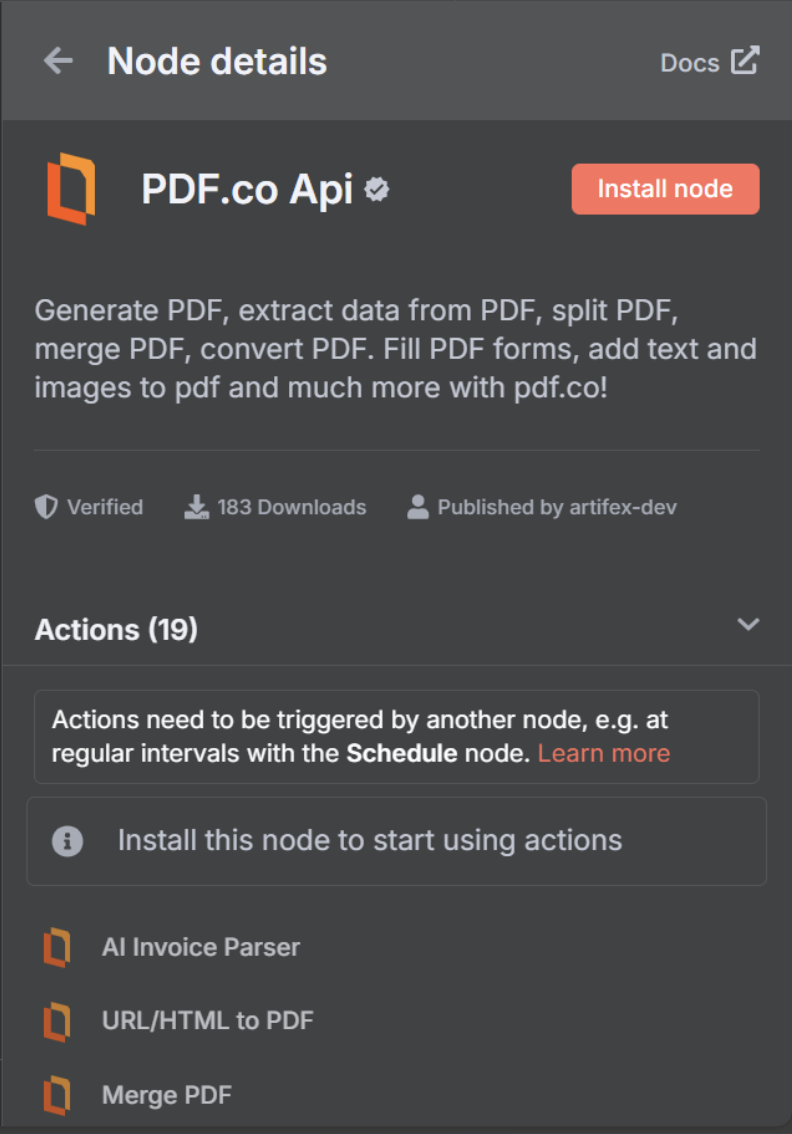
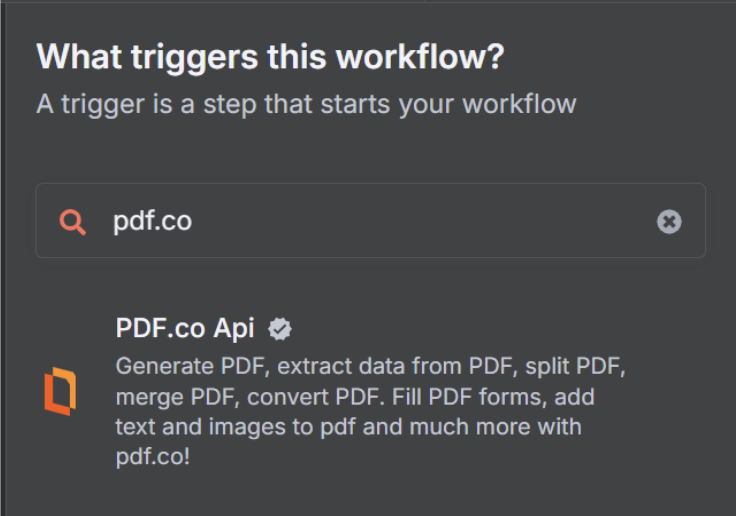 3. **Install the Node**\
Click on the **PDF.co Api** node, and in the node details window, click the **Install Node** button.
3. **Install the Node**\
Click on the **PDF.co Api** node, and in the node details window, click the **Install Node** button.
 ## Operations
This node provides comprehensive PDF processing capabilities through PDF.co's API. Here are the available features:
### **1. [AI Invoice Parser](/integrations/n8n/ai-invoice-parser)**
* Extract data from invoices using AI-powered parsing
### **2. [URL/HTML to PDF](/integrations/n8n/url-html-to-pdf)**
* Convert Type options: `URL to PDF`, `HTML to PDF`, `HTML Template to PDF`
### **3. [Merge PDF](/integrations/n8n/merge-pdf)**
* Merge multiple file URLs into a single PDF
* `Automatically Convert Non-PDF Files` converts DOC, DOCX, XLS, JPG, PNG, MSG, and EML files to PDF before merging
### **4. [Split PDF](/integrations/n8n/split-pdf)**
* Split By options: `Page Numbers`, `Search Text`, `Barcode`
### **5. [Convert To PDF](/integrations/n8n/convert-to-pdf)**
* Convert Type options: `CSV to PDF`, `Document to PDF (RTF, DOC, DOCX, TXT)`, `Email to PDF (MSG or EML)`, `Image to PDF (JPG, PNG, TIFF)`, `XLS to PDF`, `XLSX to PDF`
### **6. [Convert From PDF](/integrations/n8n/convert-from-pdf)**
* Convert Type options: `PDF to CSV`, `PDF to HTML`, `PDF to JPG`, `PDF to JSON (AI-Powered)`, `PDF to JSON (Simple)`, `PDF to PNG`, `PDF to Text`, `PDF to Text (No Layout & Fast)`, `PDF to TIFF`, `PDF to WEBP`, `PDF to XLS`, `PDF to XLSX`, `PDF to XML`
### **7. [Add Text/Images to PDF](/integrations/n8n/add-text-image-to-pdf)**
* Add text with the `Text` field and images with the `Images` field, using coordinates and styling options
### **8. [Fill a PDF Form](/integrations/n8n/fill-a-pdf-form)**
* Fill interactive PDF forms with text, checkboxes, and other form elements
### **9. [PDF Information & Form Fields](/integrations/n8n/get-pdf-information)**
* Extract PDF metadata; enable `Extract Fillable Fields` to return form field information
### **10. [Compress PDF](/integrations/n8n/compress-pdf)**
* Reduce PDF file size while maintaining quality
* Optional `Custom Compression Configuration` for fine-grained control
### **11. [PDF Security](/integrations/n8n/pdf-add-remove-security)**
* Operation Mode options: `Add Security`, `Remove Security`
### **12. [Rotate PDF Pages](/integrations/n8n/rotate-pdf)**
* Rotation Mode options: `Auto`, `Manual`
### **13. [Delete PDF Pages](/integrations/n8n/delete-page-in-pdf)**
* Remove specific pages from a PDF document
### **14. [Search in PDF](/integrations/n8n/search-in-pdf)**
* Search for specific text within PDF documents or scanned images
### **15. [Search & Replace Text or Delete](/integrations/n8n/search-and-replace-text-in-pdf)**
* Operation Type options: `Search and Delete Text`, `Search and Replace Text`, `Search and Replace with Image`
### **16. [Barcode Reader](/integrations/n8n/barcode-reader)**
* Decode barcodes from images or PDF documents
### **17. [Barcode Generator](/integrations/n8n/barcode-generator)**
* Generate barcodes including QR codes, Code 128, Code 39, and more
### **18. [Make PDF Searchable or Unsearchable](/integrations/n8n/make-pdf-searchable-or-unsearchable)**
* Options: `Make PDF Searchable` (OCR), `Make PDF Unsearchable`
### **19. [Upload File to PDF.co](/integrations/n8n/upload-file)**
* Upload Method options: `Standard Upload` (direct upload, supports files up to 2GB), `Base64`
## Credentials
To use this node, you need a PDF.co API key. Here's how to get started:
1. Sign up for a PDF.co account at [**https://pdf.co**](https://pdf.co)
2. Navigate to your dashboard and obtain your API key
3. In n8n, add your PDF.co credentials by providing your API key
## Usage
This node allows you to automate PDF processing tasks in your n8n workflows. Here are some common use cases:
* Process invoices using AI-powered parsing
* Automatically convert HTML reports to PDF
* Merge multiple PDF documents into a single file
* Extract text from PDF documents for data processing
* Add watermarks to PDF documents
* Compress PDF files to reduce size
* Secure PDFs with password protection
* Convert various document formats to PDF
* Extract data from PDFs to other formats
* Manage and modify PDF documents programmatically
This documentation is built and hosted on [Mintlify](https://mintlify.com), a developer documentation platform.
## Operations
This node provides comprehensive PDF processing capabilities through PDF.co's API. Here are the available features:
### **1. [AI Invoice Parser](/integrations/n8n/ai-invoice-parser)**
* Extract data from invoices using AI-powered parsing
### **2. [URL/HTML to PDF](/integrations/n8n/url-html-to-pdf)**
* Convert Type options: `URL to PDF`, `HTML to PDF`, `HTML Template to PDF`
### **3. [Merge PDF](/integrations/n8n/merge-pdf)**
* Merge multiple file URLs into a single PDF
* `Automatically Convert Non-PDF Files` converts DOC, DOCX, XLS, JPG, PNG, MSG, and EML files to PDF before merging
### **4. [Split PDF](/integrations/n8n/split-pdf)**
* Split By options: `Page Numbers`, `Search Text`, `Barcode`
### **5. [Convert To PDF](/integrations/n8n/convert-to-pdf)**
* Convert Type options: `CSV to PDF`, `Document to PDF (RTF, DOC, DOCX, TXT)`, `Email to PDF (MSG or EML)`, `Image to PDF (JPG, PNG, TIFF)`, `XLS to PDF`, `XLSX to PDF`
### **6. [Convert From PDF](/integrations/n8n/convert-from-pdf)**
* Convert Type options: `PDF to CSV`, `PDF to HTML`, `PDF to JPG`, `PDF to JSON (AI-Powered)`, `PDF to JSON (Simple)`, `PDF to PNG`, `PDF to Text`, `PDF to Text (No Layout & Fast)`, `PDF to TIFF`, `PDF to WEBP`, `PDF to XLS`, `PDF to XLSX`, `PDF to XML`
### **7. [Add Text/Images to PDF](/integrations/n8n/add-text-image-to-pdf)**
* Add text with the `Text` field and images with the `Images` field, using coordinates and styling options
### **8. [Fill a PDF Form](/integrations/n8n/fill-a-pdf-form)**
* Fill interactive PDF forms with text, checkboxes, and other form elements
### **9. [PDF Information & Form Fields](/integrations/n8n/get-pdf-information)**
* Extract PDF metadata; enable `Extract Fillable Fields` to return form field information
### **10. [Compress PDF](/integrations/n8n/compress-pdf)**
* Reduce PDF file size while maintaining quality
* Optional `Custom Compression Configuration` for fine-grained control
### **11. [PDF Security](/integrations/n8n/pdf-add-remove-security)**
* Operation Mode options: `Add Security`, `Remove Security`
### **12. [Rotate PDF Pages](/integrations/n8n/rotate-pdf)**
* Rotation Mode options: `Auto`, `Manual`
### **13. [Delete PDF Pages](/integrations/n8n/delete-page-in-pdf)**
* Remove specific pages from a PDF document
### **14. [Search in PDF](/integrations/n8n/search-in-pdf)**
* Search for specific text within PDF documents or scanned images
### **15. [Search & Replace Text or Delete](/integrations/n8n/search-and-replace-text-in-pdf)**
* Operation Type options: `Search and Delete Text`, `Search and Replace Text`, `Search and Replace with Image`
### **16. [Barcode Reader](/integrations/n8n/barcode-reader)**
* Decode barcodes from images or PDF documents
### **17. [Barcode Generator](/integrations/n8n/barcode-generator)**
* Generate barcodes including QR codes, Code 128, Code 39, and more
### **18. [Make PDF Searchable or Unsearchable](/integrations/n8n/make-pdf-searchable-or-unsearchable)**
* Options: `Make PDF Searchable` (OCR), `Make PDF Unsearchable`
### **19. [Upload File to PDF.co](/integrations/n8n/upload-file)**
* Upload Method options: `Standard Upload` (direct upload, supports files up to 2GB), `Base64`
## Credentials
To use this node, you need a PDF.co API key. Here's how to get started:
1. Sign up for a PDF.co account at [**https://pdf.co**](https://pdf.co)
2. Navigate to your dashboard and obtain your API key
3. In n8n, add your PDF.co credentials by providing your API key
## Usage
This node allows you to automate PDF processing tasks in your n8n workflows. Here are some common use cases:
* Process invoices using AI-powered parsing
* Automatically convert HTML reports to PDF
* Merge multiple PDF documents into a single file
* Extract text from PDF documents for data processing
* Add watermarks to PDF documents
* Compress PDF files to reduce size
* Secure PDFs with password protection
* Convert various document formats to PDF
* Extract data from PDFs to other formats
* Manage and modify PDF documents programmatically
This documentation is built and hosted on [Mintlify](https://mintlify.com), a developer documentation platform.