> ## Documentation Index
> Fetch the complete documentation index at: https://developer.pdf.co/llms.txt
> Use this file to discover all available pages before exploring further.
# Make PDF.co API Call
> This feature enables users to perform arbitrary authorized API calls to **PDF.co**. It provides the flexibility to use various **PDF.co** API endpoints for a range of **PDF** related tasks.
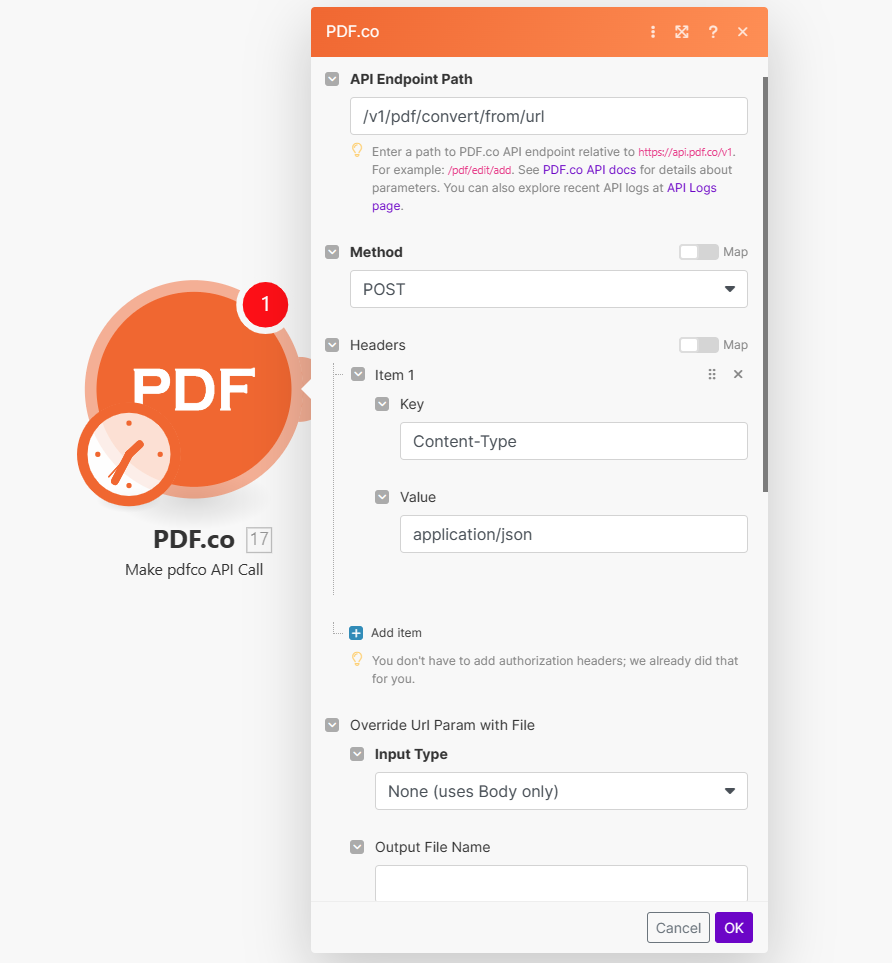 ## Input
| Name | Description | Required |
| - | - | - |
| **API Endpoint Path** | Specify the path to a **PDF.co** API endpoint, relative to `https://api.pdf.co/v1`. Example: **/pdf/edit/add**. For parameter details, refer to [PDF.co API documentation](/api). Check recent API logs at [API Logs page](https://app.pdf.co/account/logs/api). | Yes |
| **Method** | Choose the HTTP method: `GET`, `POST`, `PUT`, `PATCH`, `DELETE`. | Yes |
| **Headers** | Add additional header Key/Value to the request. Authorization headers are automatically included. | Yes |
***
| Name | Description | Required |
| - | - | - |
| **Input Type** | Override URL parameter by selecting an Input Type. Options: `None (uses Body only)`, `Upload files and inject as URL param`, `Override URL param with value`. | Yes |
**Upload files and inject as url param**
| Name | Description | Required |
| - | - | - |
| **Data** | Upload a file using raw binary data from another module. Note: This requires additional credits as it first uploads to [PDF.co Temporary Files Storage](/api/file-upload). | Yes |
| **Output File Name** | Specify a custom file name for the output file. | No |
**Override url param with value**
| Name | Description | Required |
| - | - | - |
| **URL** | Provide the URL to the source document, or a `filetoken://` link from [PDF.co Built-In Files Storage](https://app.pdf.co/files). If you use another cloud service such as **Google Drive** or **Dropbox** ensure the link is publicly accessible. | Yes |
| **Output File Name** | Specify a custom file name for the output file. | No |
| Name | Description | Required |
| - | - | - |
| **Body** | Add request body key/value. Refer to [PDF.co API documentation](/api) for details on supported parameters. | No |
| **Forcely enable \`async\` mode** | Forces async mode by adding `async: true` to input params. Recommended for better performance. No effect if `Body` already has `async` defined. | No |
| **Auto-run \`job/check\` for async jobs** | Automatically runs `v1/job/check` for async jobs until completion. Note: Checking async job status consumes credits. For long jobs (40+ sec), disable this and use a separate module for job status checks. | No |
| **Export Type** | Choose between `Download a File` or `JSON Output`. Default is `Download a File`. | No |
## Output
| Name | Description |
| - | - |
| `url` | This is the temporary **URL** provided by the **PDF.co** file server. |
| `Data` | Represents the output binary data. This data is generated only when the `Export Type` option is set to `Download a File`. |
| `Status` | Indicates the [response status](/api/introduction) code. A `success` status is returned if the operation is successful. |
| `outputLinkValidTill` | Specifies the timestamp until which the `url` remains accessible. |
| `error` | Provides details about any errors encountered during the process, if applicable. |
| `File Name` | The designated name of the output file. |
| `Job Id` | A unique identifier assigned to the job. |
| `credits` | The amount of credits utilized for the process. |
| `Remaining Credits` | Displays the balance of credits available in your account. |
| `duration` | The duration of time the process took to complete. |
This documentation is built and hosted on [Mintlify](https://mintlify.com), a developer documentation platform.
## Input
| Name | Description | Required |
| - | - | - |
| **API Endpoint Path** | Specify the path to a **PDF.co** API endpoint, relative to `https://api.pdf.co/v1`. Example: **/pdf/edit/add**. For parameter details, refer to [PDF.co API documentation](/api). Check recent API logs at [API Logs page](https://app.pdf.co/account/logs/api). | Yes |
| **Method** | Choose the HTTP method: `GET`, `POST`, `PUT`, `PATCH`, `DELETE`. | Yes |
| **Headers** | Add additional header Key/Value to the request. Authorization headers are automatically included. | Yes |
***
| Name | Description | Required |
| - | - | - |
| **Input Type** | Override URL parameter by selecting an Input Type. Options: `None (uses Body only)`, `Upload files and inject as URL param`, `Override URL param with value`. | Yes |
**Upload files and inject as url param**
| Name | Description | Required |
| - | - | - |
| **Data** | Upload a file using raw binary data from another module. Note: This requires additional credits as it first uploads to [PDF.co Temporary Files Storage](/api/file-upload). | Yes |
| **Output File Name** | Specify a custom file name for the output file. | No |
**Override url param with value**
| Name | Description | Required |
| - | - | - |
| **URL** | Provide the URL to the source document, or a `filetoken://` link from [PDF.co Built-In Files Storage](https://app.pdf.co/files). If you use another cloud service such as **Google Drive** or **Dropbox** ensure the link is publicly accessible. | Yes |
| **Output File Name** | Specify a custom file name for the output file. | No |
| Name | Description | Required |
| - | - | - |
| **Body** | Add request body key/value. Refer to [PDF.co API documentation](/api) for details on supported parameters. | No |
| **Forcely enable \`async\` mode** | Forces async mode by adding `async: true` to input params. Recommended for better performance. No effect if `Body` already has `async` defined. | No |
| **Auto-run \`job/check\` for async jobs** | Automatically runs `v1/job/check` for async jobs until completion. Note: Checking async job status consumes credits. For long jobs (40+ sec), disable this and use a separate module for job status checks. | No |
| **Export Type** | Choose between `Download a File` or `JSON Output`. Default is `Download a File`. | No |
## Output
| Name | Description |
| - | - |
| `url` | This is the temporary **URL** provided by the **PDF.co** file server. |
| `Data` | Represents the output binary data. This data is generated only when the `Export Type` option is set to `Download a File`. |
| `Status` | Indicates the [response status](/api/introduction) code. A `success` status is returned if the operation is successful. |
| `outputLinkValidTill` | Specifies the timestamp until which the `url` remains accessible. |
| `error` | Provides details about any errors encountered during the process, if applicable. |
| `File Name` | The designated name of the output file. |
| `Job Id` | A unique identifier assigned to the job. |
| `credits` | The amount of credits utilized for the process. |
| `Remaining Credits` | Displays the balance of credits available in your account. |
| `duration` | The duration of time the process took to complete. |
This documentation is built and hosted on [Mintlify](https://mintlify.com), a developer documentation platform.