> ## Documentation Index
> Fetch the complete documentation index at: https://developer.pdf.co/llms.txt
> Use this file to discover all available pages before exploring further.
# Read a Barcode
> This feature facilitates the reading of barcodes from various sources such as images, **TIFF** files, **PDF** documents, and scanned documents. It is capable of interpreting all popular barcode types, ranging from **Code 39** and **Code 128** to **QR Code**, **Datamatrix**, and **PDF417**. The tool is designed to effectively handle noisy and damaged barcodes, scans, and documents, ensuring accurate barcode recognition.
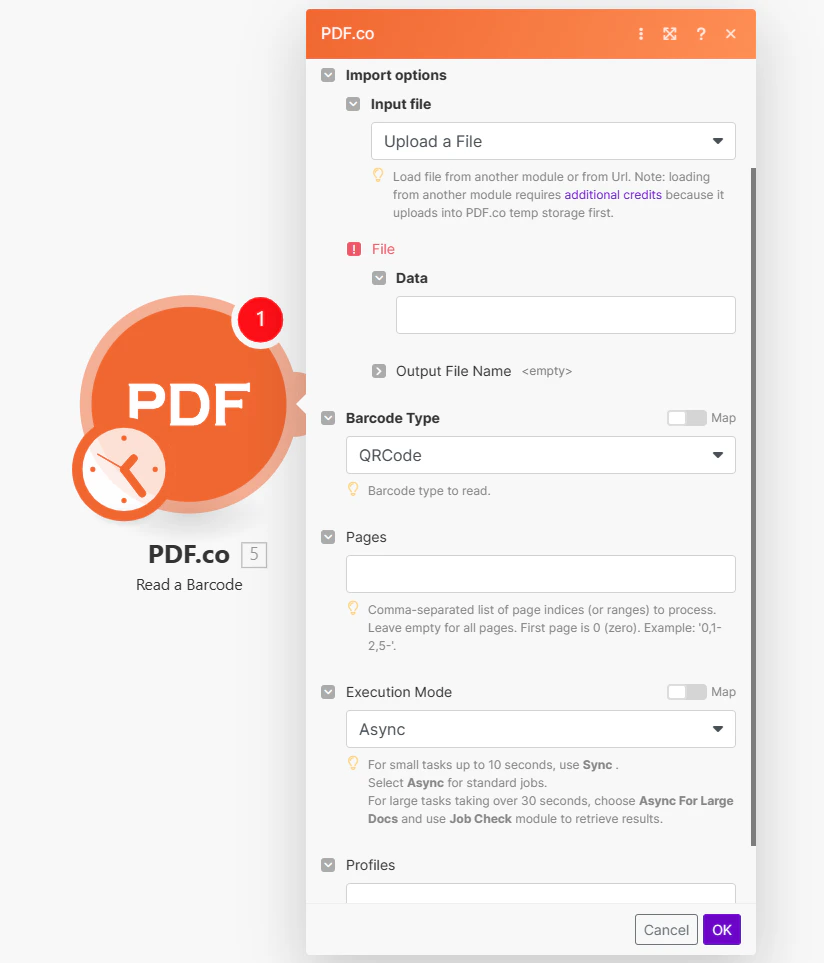 ## Input
The Make module doesn't expose every PDF.co API parameter as a field. To pass a parameter that isn't shown, use the **Profiles** field with `std_params`. Enable **Advanced Settings** to see it (see [Profiles](#profiles)). See [Standard Parameters](/api/profiles#standard-parameters) for details.
| Name | Description | Required |
| - | - | - |
| **Import Options** | Choose the input source, either `Upload a File` or `Import PDF or image from URL`. | Yes |
***
**Upload a File**
| Name | Description | Required |
| - | - | - |
| **Data** | Upload a file using raw binary data from another module. Note: This requires additional credits as it first uploads to [PDF.co Temporary Files Storage](/api/file-upload). | Yes |
| **Output File Name** | Specify a custom file name for the output file. | No |
**Import PDF or image from URL**
| Name | Description | Required |
| - | - | - |
| **URL** | Provide the URL to the source **PDF** document, or a `filetoken://` link from [PDF.co Built-In Files Storage](https://app.pdf.co/files). If you use another cloud service such as **Google Drive** or **Dropbox** ensure the link is publicly accessible. | Yes |
| **Output File Name** | Specify a custom file name for the output file. | No |
| Name | Description | Required |
| - | - | - |
| **Barcode Type** | Select the barcode type for decoding. Defaults to **QR Code**, with support for various other formats. | No |
| **Pages** | Specify page numbers or ranges for barcode reading. Leave blank to scan all pages. The first page starts at `0`. Example: `0,2-5,7-`. | No |
| **Execution Mode** | Select **Sync** for small tasks up to `10` seconds. Choose **Async** for standard jobs, or **Async For Large Docs** for tasks over `30` seconds. Use **Job Check** module for retrieving results in large tasks. | No |
| **Profiles** | Add custom options for the process in a `JSON` string format. See [API Profiles](#profiles) for more details. | No |
### Integrating External File Sources
Streamline your **Make** workflows with external file sources like **Google Drive** and **Dropbox** using their unique actions. Discover efficient integration strategies in our guide: [File Source Integrations in Make](/integrations/make/input-file-sources).
## Output
| Name | Description |
| - | - |
| `url` | This is the temporary **URL** provided by the **PDF.co** file server. |
| `Barcodes` | An array containing detailed barcode information such as `Value`, `Type`, `TypeName`, `Page`, `Rect`, and others. |
| `Status` | Indicates the [response status](/api/introduction) code. A `success` status is returned if the operation is successful. |
| `outputLinkValidTill` | Specifies the timestamp until which the `url` remains accessible. |
| `error` | Provides details about any errors encountered during the process, if applicable. |
| `name` | The designated name of the output file. |
| `Job Id` | A unique identifier assigned to the job. |
| `credits` | The amount of credits utilized for the process. |
| `Remaining Credits` | Displays the balance of credits available in your account. |
| `duration` | The duration of time the process took to complete. |
### Profiles
To display the Profiles fields, you must **enable Advanced Settings** by clicking the toggle:
## Input
The Make module doesn't expose every PDF.co API parameter as a field. To pass a parameter that isn't shown, use the **Profiles** field with `std_params`. Enable **Advanced Settings** to see it (see [Profiles](#profiles)). See [Standard Parameters](/api/profiles#standard-parameters) for details.
| Name | Description | Required |
| - | - | - |
| **Import Options** | Choose the input source, either `Upload a File` or `Import PDF or image from URL`. | Yes |
***
**Upload a File**
| Name | Description | Required |
| - | - | - |
| **Data** | Upload a file using raw binary data from another module. Note: This requires additional credits as it first uploads to [PDF.co Temporary Files Storage](/api/file-upload). | Yes |
| **Output File Name** | Specify a custom file name for the output file. | No |
**Import PDF or image from URL**
| Name | Description | Required |
| - | - | - |
| **URL** | Provide the URL to the source **PDF** document, or a `filetoken://` link from [PDF.co Built-In Files Storage](https://app.pdf.co/files). If you use another cloud service such as **Google Drive** or **Dropbox** ensure the link is publicly accessible. | Yes |
| **Output File Name** | Specify a custom file name for the output file. | No |
| Name | Description | Required |
| - | - | - |
| **Barcode Type** | Select the barcode type for decoding. Defaults to **QR Code**, with support for various other formats. | No |
| **Pages** | Specify page numbers or ranges for barcode reading. Leave blank to scan all pages. The first page starts at `0`. Example: `0,2-5,7-`. | No |
| **Execution Mode** | Select **Sync** for small tasks up to `10` seconds. Choose **Async** for standard jobs, or **Async For Large Docs** for tasks over `30` seconds. Use **Job Check** module for retrieving results in large tasks. | No |
| **Profiles** | Add custom options for the process in a `JSON` string format. See [API Profiles](#profiles) for more details. | No |
### Integrating External File Sources
Streamline your **Make** workflows with external file sources like **Google Drive** and **Dropbox** using their unique actions. Discover efficient integration strategies in our guide: [File Source Integrations in Make](/integrations/make/input-file-sources).
## Output
| Name | Description |
| - | - |
| `url` | This is the temporary **URL** provided by the **PDF.co** file server. |
| `Barcodes` | An array containing detailed barcode information such as `Value`, `Type`, `TypeName`, `Page`, `Rect`, and others. |
| `Status` | Indicates the [response status](/api/introduction) code. A `success` status is returned if the operation is successful. |
| `outputLinkValidTill` | Specifies the timestamp until which the `url` remains accessible. |
| `error` | Provides details about any errors encountered during the process, if applicable. |
| `name` | The designated name of the output file. |
| `Job Id` | A unique identifier assigned to the job. |
| `credits` | The amount of credits utilized for the process. |
| `Remaining Credits` | Displays the balance of credits available in your account. |
| `duration` | The duration of time the process took to complete. |
### Profiles
To display the Profiles fields, you must **enable Advanced Settings** by clicking the toggle:
 You can set additional options for the operation used in the [PDF.co](http://pdf.co/) module by using **Profiles**. A profile is a string in JSON-like format containing predefined parameters.
### Here’s an example of a Custom Profiles input:
```json theme={null}
{ "outputDataFormat": "base64" }
```
With this input, the [PDF.co](http://pdf.co/) module will return the output in base64 format. You can find the list of available parameters for customizing profiles in the [PDF.co](http://pdf.co/) operation documentation below:
You can use any regular API parameter from the [API Reference](/api) within Make using the `std_params` feature in profiles. The `std_params` enables the definition of regular API parameters in a JSON format, See [Standard Parameters](/api/profiles#standard-parameters) for detailed documentation and examples.
| Parameter | Type | Default | Description |
| - | - | - | - |
| `DataEncryptionAlgorithm` | string | - | Controls the encryption algorithm used for data encryption. See User-Controlled Encryption for more information. The available algorithms are: AES128, AES192, AES256. |
| `DataEncryptionKey` | string | - | Controls the encryption key used for data encryption. See User-Controlled Encryption for more information. |
| `DataEncryptionIV` | string | - | Controls the encryption IV used for data encryption. See User-Controlled Encryption for more information. |
| `DataDecryptionAlgorithm` | string | - | Controls the decryption algorithm used for data decryption. See User-Controlled Encryption for more information. The available algorithms are: AES128, AES192, AES256. |
| `DataDecryptionKey` | string | - | Controls the decryption key used for data decryption. See User-Controlled Encryption for more information. |
| `DataDecryptionIV` | string | - | Controls the decryption IV used for data decryption. See User-Controlled Encryption for more information. |
This documentation is built and hosted on [Mintlify](https://mintlify.com), a developer documentation platform.
You can set additional options for the operation used in the [PDF.co](http://pdf.co/) module by using **Profiles**. A profile is a string in JSON-like format containing predefined parameters.
### Here’s an example of a Custom Profiles input:
```json theme={null}
{ "outputDataFormat": "base64" }
```
With this input, the [PDF.co](http://pdf.co/) module will return the output in base64 format. You can find the list of available parameters for customizing profiles in the [PDF.co](http://pdf.co/) operation documentation below:
You can use any regular API parameter from the [API Reference](/api) within Make using the `std_params` feature in profiles. The `std_params` enables the definition of regular API parameters in a JSON format, See [Standard Parameters](/api/profiles#standard-parameters) for detailed documentation and examples.
| Parameter | Type | Default | Description |
| - | - | - | - |
| `DataEncryptionAlgorithm` | string | - | Controls the encryption algorithm used for data encryption. See User-Controlled Encryption for more information. The available algorithms are: AES128, AES192, AES256. |
| `DataEncryptionKey` | string | - | Controls the encryption key used for data encryption. See User-Controlled Encryption for more information. |
| `DataEncryptionIV` | string | - | Controls the encryption IV used for data encryption. See User-Controlled Encryption for more information. |
| `DataDecryptionAlgorithm` | string | - | Controls the decryption algorithm used for data decryption. See User-Controlled Encryption for more information. The available algorithms are: AES128, AES192, AES256. |
| `DataDecryptionKey` | string | - | Controls the decryption key used for data decryption. See User-Controlled Encryption for more information. |
| `DataDecryptionIV` | string | - | Controls the decryption IV used for data decryption. See User-Controlled Encryption for more information. |
This documentation is built and hosted on [Mintlify](https://mintlify.com), a developer documentation platform.